
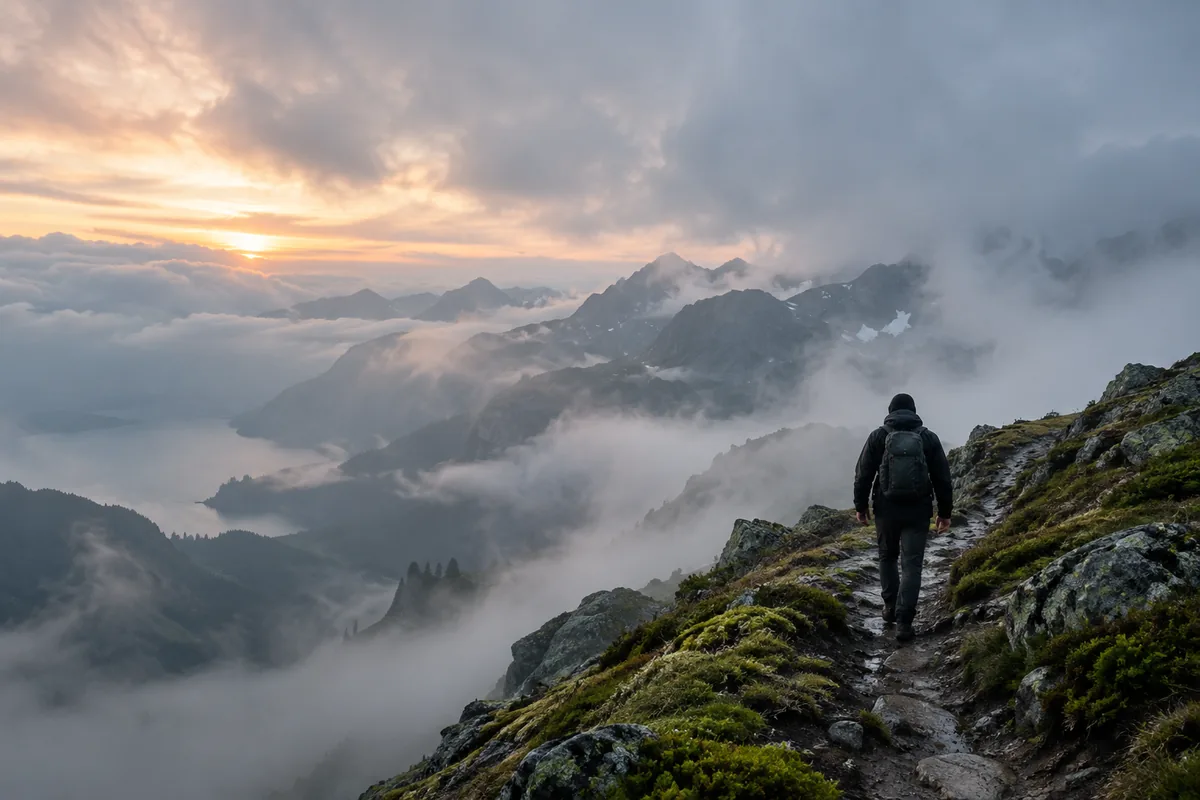
What is a faceless video generator?
A faceless video generator creates a video without a visible presenter. Everygen generates the scene itself from a prompt or first frame; it does not provide a library of reusable talking avatars or automatic lip-sync.
Use faceless framing when the audience should focus on the environment, product or action.
Shoot-from-behind, silhouette, close-up hands and object-led perspectives are easy ways to keep the face outside the frame.
What faceless video styles work best?
Mystery journeys, quiet product films, miniature stories, historical reenactments and atmospheric explainers are strong faceless formats. They give the model clear physical action without requiring facial performance.
- A traveler walking into fog or a new environment.
- Hands opening, assembling or testing a product.
- A small figure moving through a large cinematic world.
- A transformation or reveal driven by light, weather or motion.
How do you make a faceless Short with AI?
Describe the environment first, then place a small or partial subject inside it. Choose 9:16 for vertical distribution and keep the main action inside the center safe area.
- Write one location and one movement from start to finish.
- Explicitly say “seen from behind,” “silhouette” or “face outside frame.”
- Use Seedance 2.5 when the clip needs generated ambience or narration.
- Add captions, music and the final hook in post-production when precision matters.
Can faceless videos include voiceover or sound?
Seedance 2.5 can generate native audio and supports clips up to 30 seconds. Kling 3.0 Turbo is silent in the current studio but can be paired with music or narration added in an editor.
Keep generated spoken lines short and review pronunciation and meaning before publishing.
Ambient sound such as wind, footsteps, rain or room tone often fits faceless storytelling better than lip-synced dialogue.
How many faceless clips can you make with Everygen credits?
The Starter plan’s 900 credits cover 56 four-second Seedance clips at 720p or 100 four-second Kling clips. Longer videos reduce the number of generations.
A 15-second Kling clip costs 34 credits.
An 8-second Seedance 1080p clip costs 35 credits.
Annual Starter billing currently starts at $9 per month.
What are good prompt examples?
Strong prompts describe a visible action, one location and one camera direction. Adapt the subject and product details rather than copying a prompt without checking the result.
Mountain mystery
Vertical cinematic shot from behind of a lone hiker walking a narrow alpine trail into thick fog, dark weatherproof coat, wet stone, dawn glow at the horizon, small figure in the lower third, slow follow camera, no face visible.
Hands and product
Close overhead shot of two hands opening a matte black presentation box on a walnut desk, soft window light, realistic skin texture, one smooth reveal, face and logos outside the frame.
Miniature journey
A tiny red car travels across a rain-soaked miniature city at night, reflected streetlights, slow low-angle tracking camera, cinematic scale contrast, no people visible.
Faceless clip cost examples
Credit totals use the current Everygen studio settings and are rounded up to a whole credit for each generation.
| Model | Duration | Resolution | Credits |
|---|---|---|---|
| Kling 3.0 Turbo | 4 sec | 720p | 9 |
| Kling 3.0 Turbo | 15 sec | 720p | 34 |
| Seedance 2.5 | 4 sec | 720p | 16 |
| Seedance 2.5 | 30 sec | 1080p | 132 |
What matters most before you generate?
- Start with one clear action and one camera direction so the model has a specific motion to solve.
- Upload a clean first frame whenever product shape or a particular scene must stay consistent.
- Test a short, lower-cost generation before committing to a longer Seedance render.
- Review text, hands, product details, audio and disclosure requirements before publishing.